
Pay Per View (Charge per Movie/Episode)
MovieEngine pay per view PPV movie episode: Pay Per View (PPV) allows you to sell individual movies or episodes by charging users a one-time fee for access. Unlike subscription-based models, users do not need an active membership plan — they can simply purchase specific content they want to watch. This makes PPV ideal for offering premium, exclusive, or early-access content while giving users more flexible payment options.
🛠️ How to Enable PPV
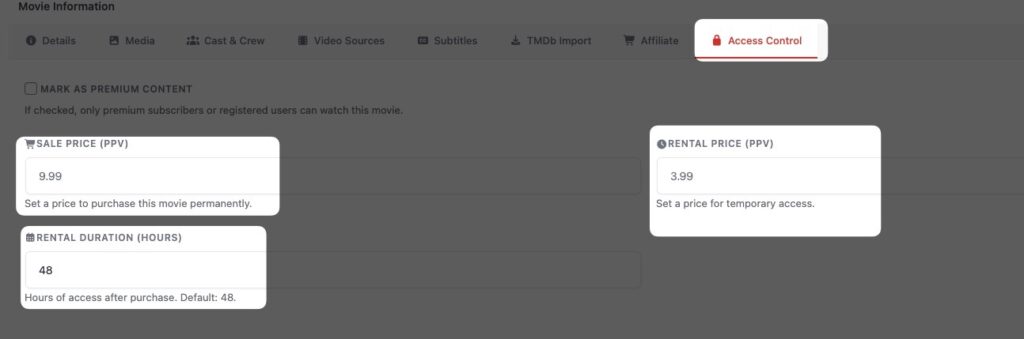
- Go to Movie / Episode edit page
- Open Access Control
- Select Pay Per View
- Set price
⚙️ How It Works
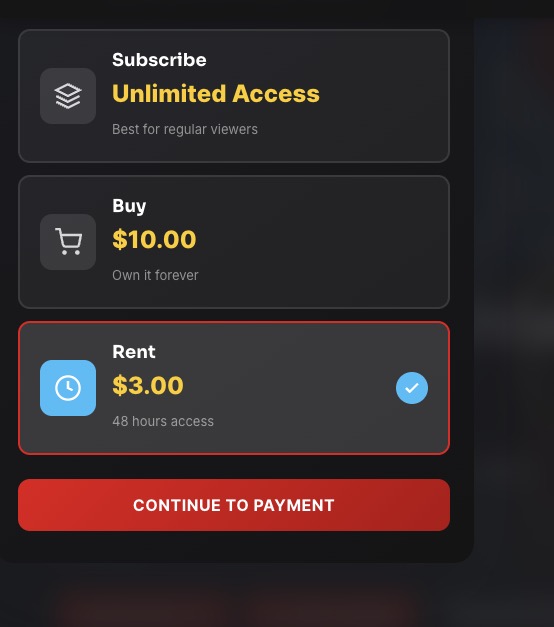
- User clicks “Unlock”
- Completes payment
- Gets access instantly
🎯 Use Cases
- Premium movies
- Exclusive episodes
- Special releases
💡 Best Practice
Offer both:
- Subscription (bulk access)
- PPV (premium content)
MovieEngine pay per view PPV movie episode explained
MovieEngine pay per view PPV movie episode lets you charge a one-time fee for a single movie or episode, instead of requiring a membership. Set the fee in Access Control, Pay Per View, and viewers pay for that title only. Unlike a subscription, which gives ongoing access for a period, pay-per-view gives access to one title, so it suits premium movies, exclusive episodes, and special releases.
To enable it, go to the movie or episode edit page, open Access Control, select Pay Per View, and set the price. The viewer then clicks Unlock, completes payment, and gets access instantly. Offer both options where it makes sense: a subscription for bulk access and PPV for premium content, as the best practice section on this page describes.
Frequently Asked Questions
How does MovieEngine pay per view work?
You set a one-time fee for a movie or episode in Access Control, Pay Per View, and viewers pay for that title only.
Does PPV need a membership plan?
No. Pay-per-view does not require an active membership plan for that single title.
PPV or subscription — which should I use?
Use PPV for single popular titles and subscriptions for ongoing access to your whole catalogue.
Related guides
Tip: for more about the plugin, visit the MovieEngine website.
