Monetization & Users
Membership Plans (Create & Manage Plans)
Membership plans are the core of your monetization system. They allow you to control user access and generate recurring revenue.
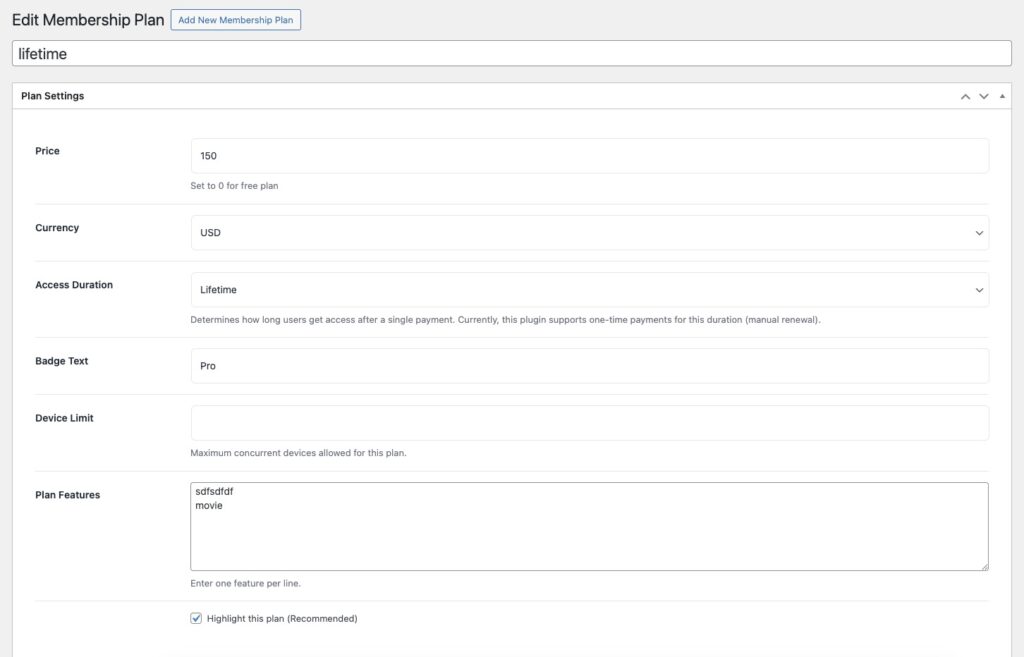
🛠️ Step-by-Step: Create a Plan
- Go to Movie Engine → Plans
- Click Add New Plan
- Configure the following:
💵 Price
Set the plan price.
- Enter
0→ Free plan - Enter value (e.g., 9.99) → Paid plan
💱 Currency
Select your payment currency (e.g., USD).
⏱️ Access Duration
Choose how long the plan remains active:
- Daily
- Weekly
- Monthly
- Yearly
- Lifetime
👉 Example: Monthly plan = access for 30 days
🏷️ Badge Text
Display label like:
- “Popular”
- “Best Value”
- “Starter Plan”
📱 Device Limit
Set how many devices can use the account simultaneously.
👉 Example:
- 1 device → Basic plan
- 3 devices → Premium plan
📋 Plan Features
Add features (one per line), such as:
- Unlimited streaming
- HD quality
- No ads
- Multi-device access
⭐ Highlight Plan
Mark a plan as recommended (used in pricing UI).
🎯 Example Setup
- Free Plan → Limited content + ads
- Monthly Plan → Full access
- Yearly Plan → Discounted price