
Configuration
Cron Management (Automation & Scheduled Tasks)
The Cron Management system allows you to monitor, clean, and automate background tasks running in your platform.
It helps you:
- Maintain performance
- Clean unnecessary cron jobs
- Manage scheduled tasks
- Prevent database overload
👉 Essential for large OTT platforms with high activity
📊 Overview Dashboard
At the top of the page, you can monitor cron activity in real time.
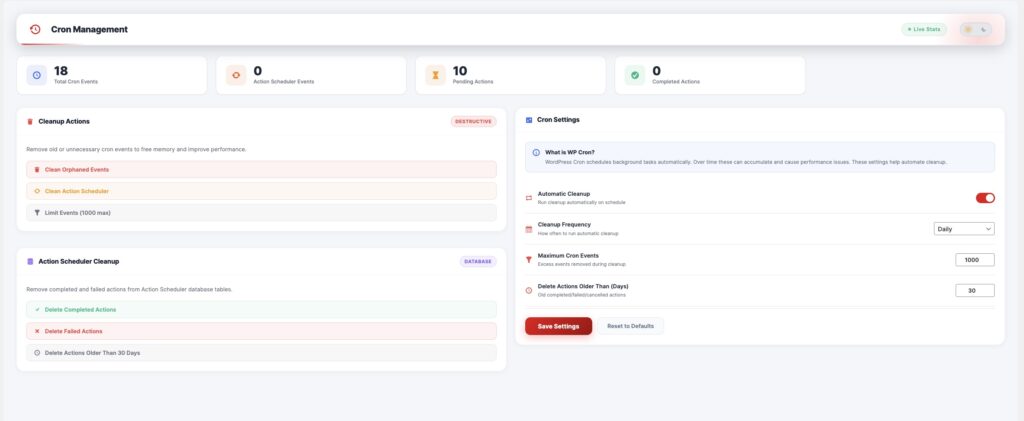
📦 Metrics
| Metric | Description |
|---|---|
| Total Cron Events | Total scheduled tasks |
| Action Scheduler Events | Tasks handled by Action Scheduler |
| Pending Actions | Tasks waiting to execute |
| Completed Actions | Successfully executed tasks |
🧹 Cleanup Actions
This section helps you remove unnecessary cron events.
⚙️ Available Actions
| Action | Description |
|---|---|
| Clean Orphaned Events | Remove broken or unused cron jobs |
| Clean Action Scheduler | Clean scheduled task queue |
| Limit Events | Set maximum number of stored cron events |
⚠️ Important
- Marked as Destructive → cannot be undone
- Always backup database before cleanup
🗄 Action Scheduler Cleanup
Used to manage database-level scheduled actions.
📦 Cleanup Options
| Option | Description |
|---|---|
| Delete Completed Actions | Remove completed tasks |
| Delete Failed Actions | Remove failed tasks |
| Delete Actions Older Than X Days | Clean old records automatically |
👉 Helps reduce database size and improve performance.
📦 Settings
| Setting | Description |
|---|---|
| Automatic Cleanup | Enable scheduled cleanup |
| Cleanup Frequency | Daily / Weekly / Monthly |
| Maximum Cron Events | Limit stored events |
| Delete Actions Older Than (Days) | Auto-delete old tasks |
🔍 What is WP Cron?
WordPress uses WP-Cron to run scheduled background tasks such as:
- Sending emails
- Processing payments
- Updating subscriptions
- Cleaning temporary data
👉 Over time, these tasks accumulate and can slow down your site.
⚙️ How It Works
User action / system trigger
   ↓
Cron job scheduled
   ↓
Task runs in background
   ↓
Stored in database
   ↓
Cleanup removes old/unnecessary tasks
🎯 Use Cases
- Clean old transaction logs
- Remove expired subscriptions data
- Optimize database performance
- Prevent cron overflow
- Maintain system health
🧠 Best Practices
- Enable Automatic Cleanup
- Set the cleanup frequency to Daily or Weekly
- Limit cron events (e.g., 500–1000 max)
- Delete actions older than 30 days
- Regularly monitor pending actions
⚠️ Important Notes
- WP-Cron depends on site traffic (not real cron)
- Low-traffic sites may delay execution
- Use server cron for high-performance setups
- Always back up before bulk cleanup
