
Template System (Override & Customize Templates)
The Template System allows developers to fully customize the frontend output of the plugin without modifying core files.
👉 This follows WordPress best practices:
- Safe customization
- Upgrade-safe overrides
- Theme-level control
🎯 Why Template Override Matters
By default, the plugin uses built-in templates.
But you can:
- Change layouts
- Modify HTML structure
- Add custom UI
- Integrate with any theme
👉 All without touching plugin core files.
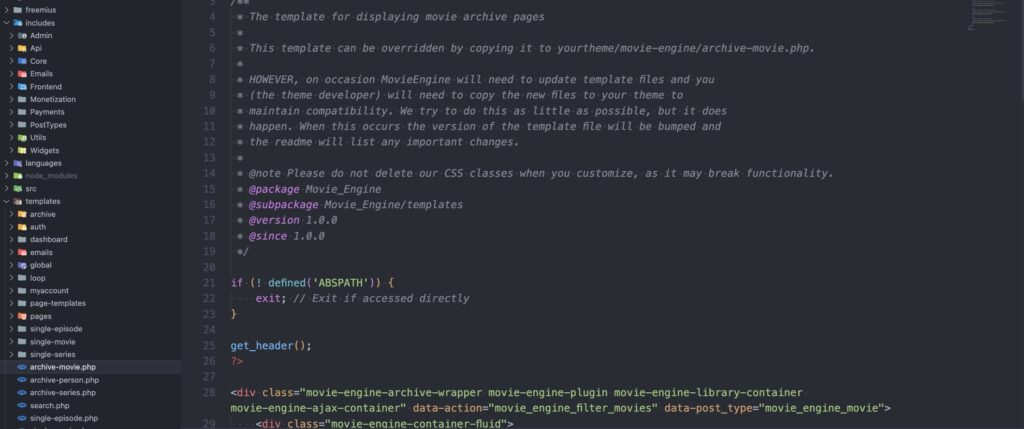
📂 Template Structure
Inside the plugin:
/templates/
├── archive/
├── single-movie/
├── single-series/
├── single-episode/
├── loop/
├── dashboard/
├── auth/
├── global/
├── pages/
Each folder represents a specific frontend area.
🔁 How Template Override Works
To override any template:
Copy from:plugin/templates/{file}.php
Paste into:your-theme/movie-engine/{file}.php
📌 Example
Override movie archive page:
Plugin:templates/archive/archive-movie.php
Theme:
your-theme/movie-engine/archive-movie.php
👉 WordPress will automatically use your theme version instead of plugin default.
⚙️ Supported Override Locations
| Template Type | Example File |
|---|---|
| Archive | archive-movie.php, archive-series.php |
| Single | single-movie.php, single-episode.php |
| Loop | loop-item.php |
| Dashboard | dashboard.php |
| Auth | login.php, register.php |
| Global | header.php, footer.php |
🧠 Important Notes (VERY IMPORTANT)
⚠️ 1. Do NOT Edit Plugin Files
❌ Wrong:
/wp-content/plugins/movie-engine/templates/...
✔ Correct:
/wp-content/themes/your-theme/movie-engine/...
⚠️ 2. Keep File Structure
- Maintain the same folder structure
- Maintain file names
👉 Otherwise, the override will not work.
⚠️ 3. Template Updates
When plugin updates:
- Templates may change
- New features may be added
👉 You must manually update overridden files if needed.
⚠️ 4. Do NOT Remove any Class
Example:
<div class="movie-engine-archive-wrapper">
❌ Removing classes can break:
- AJAX filtering
- Layout system
- Player functionality
🧱 Template Example (Basic)
<?php get_header(); ?><div class="movie-engine-archive-wrapper">
    <div class="movie-engine-container-fluid">
        <!-- Movie Loop -->
    </div>
</div><?php get_footer(); ?>
🔄 Versioning System
Each template includes version info:
@version 1.0.0
👉 When version changes:
- Compare your overridden file
- Update if necessary
⚙️ How It Works (Behind the Scenes)
User visits page
   ↓
Plugin loads template
   ↓
Checks theme override
   ↓
If exists → use theme file
Else → use plugin default
🎯 Use Cases
- Custom Netflix-style UI
- Integrate with a custom theme
- Add ads or banners
- Modify layout structure
- Add custom fields
🧠 Best Practices
- Only override what you need
- Keep templates minimal
- Use a child theme for overrides
- Document your changes
- Compare after plugin updates
⚠️ Common Mistakes
❌ Editing plugin files
❌ Removing required CSS classes
❌ Breaking HTML structure
❌ Not updating templates after update
