
Device Limit
The Device Limit feature allows users to manage and control how many devices can access their account at the same time. This is an essential feature for OTT platforms to prevent account sharing abuse and maintain content security.
Each user account is assigned a maximum number of allowed devices based on their subscription plan. Users can view active devices, monitor usage, and log out from any device remotely.
How To Set Up
Go to Settings, User Settings, and see these options

⚙️ How It Works
- Each login registers a device
- Devices are tracked with session data
- Users can see all active devices
- When the limit is reached, new logins may be restricted
✨ Key Features
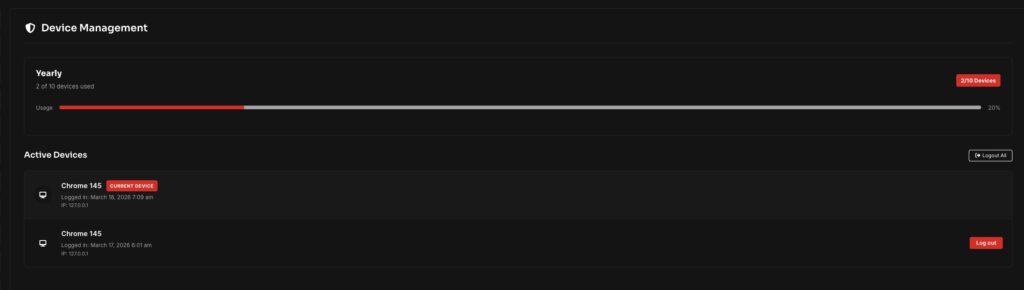
- View all active devices
- Display device name (browser/device type)
- Show login time and IP address
- Track device usage (e.g., 2/10 devices used)
- Log out from individual devices
- Log out from all devices with one click
📊 Device Usage Tracking
The system provides a visual indicator of usage:
- Example: 2 / 10 Devices Used
- Progress bar showing usage percentage
This helps users understand their current access status easily.
🔐 Security Benefits
- Prevent unauthorized account sharing
- Protect user accounts from misuse
- Allow users to remove unknown devices
- Improve overall platform security
🎯 Why It Matters
Device management is a premium OTT feature used by platforms like Netflix and Amazon Prime. It ensures:
- Controlled access
- Fair usage
- Better monetization
💡 Best Practice
Combine Device Limit with:
- Membership plans (different device limits per plan)
- Secure login systems
- Session expiration
👉 This creates a professional and secure streaming ecosystem.
