
Configuration
Import / Export
The Transfer Center allows you to export, backup, and restore your plugin configuration easily.
It is designed to help you:
- Migrate your setup to another website
- Backup important settings
- Restore configurations instantly
- Save time during development or deployment
👉 This feature is essential for developers, agencies, and multi-site setups
🎯 What You Can Do
- Export all plugin settings into a file
- Restore settings on another installation
- Create reusable configuration templates
- Backup before major updates
📦 Package Settings (Export Configuration)
This section allows you to generate a complete snapshot of your plugin configuration.
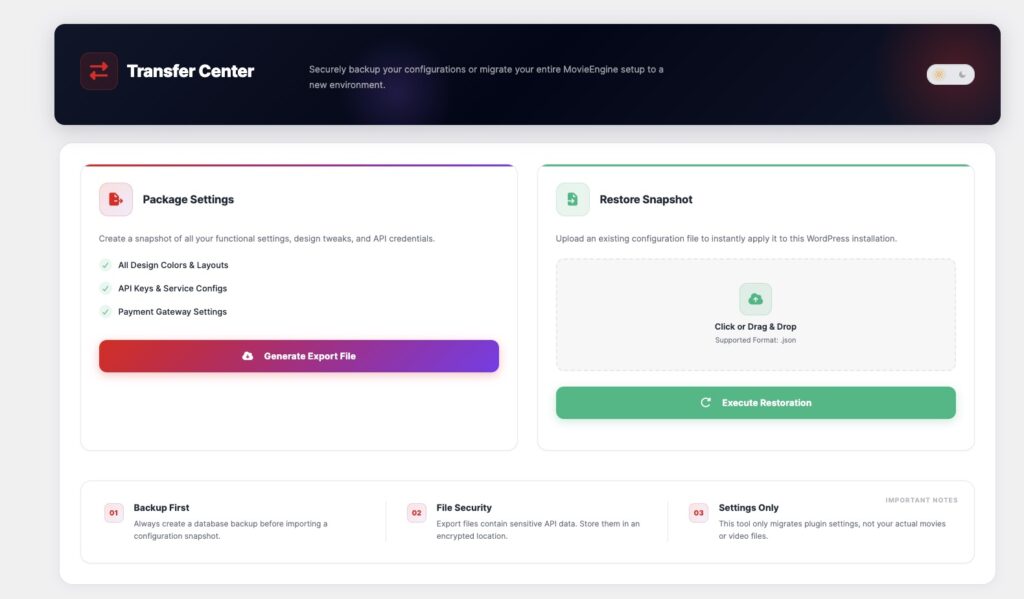
✔ Included in Export
- Design settings (colors, layouts)
- API keys & service configurations
- Payment gateway settings
⚙️ How to Export
- Go to Transfer Center → Package Settings
- Click Generate Export File
- Download the
.jsonfile
👉 This file contains all your plugin configuration settings.
♻️ Restore Snapshot (Import Configuration)
This section allows you to import and apply a previously exported configuration.
⚙️ How to Import
- Go to Transfer Center → Restore Snapshot
- Upload your
.jsonfile (drag & drop or select file) - Click Execute Restoration
👉 Your settings will be instantly applied.
📁 Supported Format
| Type | Description |
|---|---|
.json | Configuration export file |
⚙️ How It Works
Export Settings → Download JSON → Upload JSON → Restore Settings
🎯 Use Cases
- Move site from staging → production
- Backup before plugin updates
- Clone configuration across multiple sites
- Share setup with team members
⚠️ Important Notes
1. Backup First
Always create a full database backup before importing settings.
2. File Security
Export files may contain:
- API keys
- Payment credentials
👉 Store them securely.
3. Settings Only
This tool does NOT transfer content, such as:
- Movies
- Episodes
- Media files
👉 It only transfers plugin configuration.
🧠 Best Practices
- Keep backup files organized
- Use export before major changes
- Test import on staging first
- Avoid sharing config files publicly
