
Appearance & Layout
Page Settings
The Page Settings section allows you to assign specific pages to different functionalities of your platform. These pages act as core entry points for browsing, searching, and user interaction.
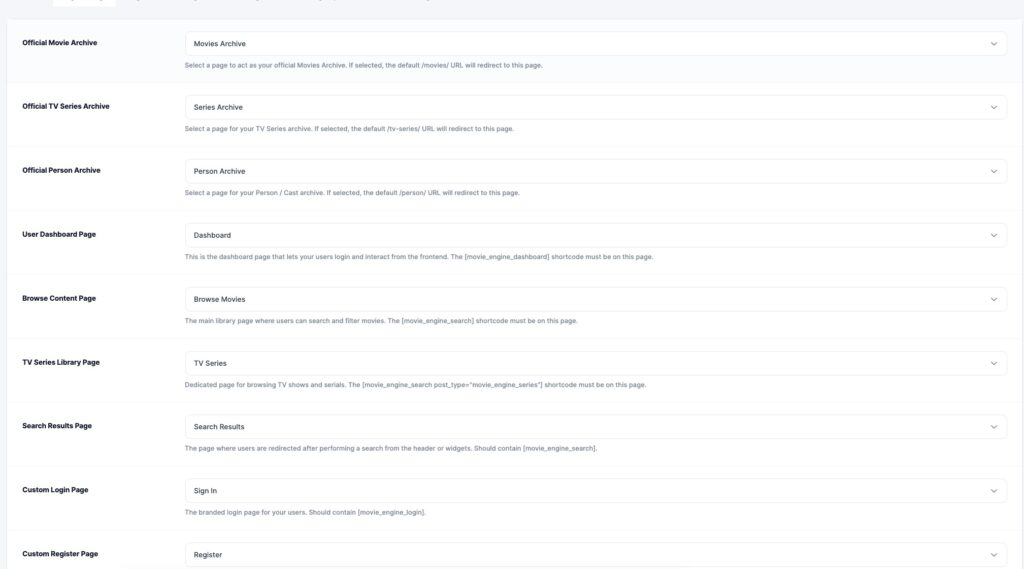
⚙️ Available Page Assignments
🎬 Official Movie Archive
Main archive page for all movies.
👉 Default URL: /movies
📺 TV Series Archive
Main archive page for TV series content.
👉 Default URL: /tv-series
👤 Person / Cast Archive
Page for displaying actors, directors, and cast members.
🧑💻 User Dashboard Page
Frontend dashboard where users can:
- Manage account
- View watch history
- Access playlists
👉 Must include shortcode:
[movie_engine_dashboard]
🔍 Browse Content Page
Main content discovery page with filtering and search.
👉 Must include shortcode:
[movie_engine_search]
📺 TV Series Library Page
Dedicated browsing page for TV series.
👉 Shortcode example:
[movie_engine_search post_type="movie_engine_series"]
🔎 Search Results Page
Page where users are redirected after performing a search.
🔐 Custom Login Page
Frontend login page for users.
👉 Must include shortcode:
[movie_engine_login]
📝 Custom Register Page
User registration page.
💡 Best Practice
Always assign proper pages to ensure:
- SEO-friendly URLs
- Smooth navigation
- Correct shortcode functionality
