
Video Player
Player Overview (Features & Capabilities)
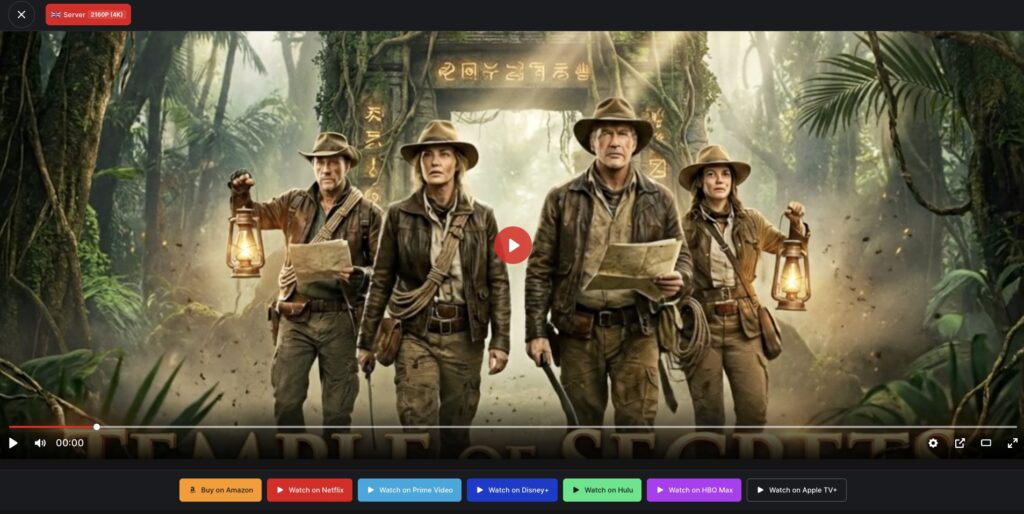
The Movie Engine player is fully integrated with your content system, allowing you to stream movies, TV series, and episodes directly on your website.
It is designed to provide:
- Fast playback
- High-quality streaming
- Flexible video source management
▶️ Multi Format Support
The player supports modern streaming formats:
- MP4 (direct video files)
- HLS (.m3u8 streaming)
- DASH (if enabled)
This ensures compatibility across different devices and network conditions.
🔁 Multi Server Support
You can add multiple video sources (servers) for each content item.
- Add backup servers
- Allow users to switch sources
- Improve reliability and uptime
💬 Subtitle Support
The player supports subtitles for better accessibility.
- Add multiple subtitle tracks
- Support for different languages
- Enable/disable subtitles during playback
🎛 Player Controls
The player includes all essential playback controls:
- Play / Pause
- Volume control
- Fullscreen mode
- Playback speed
- Seek / timeline navigation
📺 OTT-Style Experience
The player is designed to match modern streaming platforms:
- Clean and responsive UI
- Works on desktop, tablet, and mobile
- Seamless integration with your theme
🧩 Where the Player Is Used
The video player is automatically displayed on:
- Movie pages
- TV series episode pages
- Any page where video sources are added
⚠️ Important Notes
- The player requires a valid video source to work
- TMDb import does not include video files
- You must manually add video URLs
💡 Best Practices
- Use HLS (.m3u8) for better streaming performance
- Add multiple servers for reliability
- Include subtitles for accessibility
- Test playback on different devices
